How to Buy a Domain: 7 Smart Steps (And What Nobody Tells You)
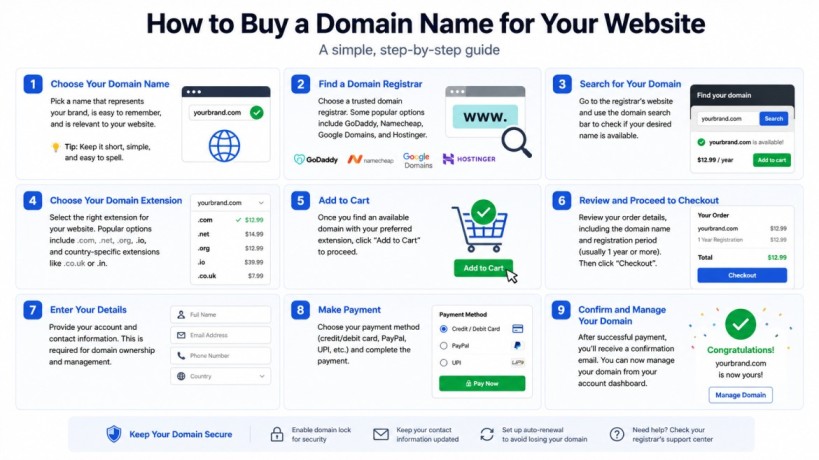
Buying a domain takes about five minutes. Buying the right domain — and not making the mistakes that cost people their website, their brand, or their sanity two years later — takes a bit more knowledge.
This guide walks you through how to buy a domain name from scratch. Whether you’re launching a blog, building a business website, or just securing a name before someone else grabs it, you’ll find everything you need here.
Let’s start with the basics.
What Is a Domain Name, Exactly?
A domain name is your website’s address on the internet. It’s what people type into a browser to find you — something like yourbrand.com or myblog.co.uk.
Under the hood, every website lives on a server identified by a numerical IP address. Domain names exist so humans don’t have to memorise strings of numbers. When you type a domain into a browser, the DNS (Domain Name System) translates it into the IP address of the server where your site lives.
ICANN — the Internet Corporation for Assigned Names and Numbers — oversees the global system that manages domain registrations. Every domain you buy must be registered through an ICANN-accredited registrar.
Domain vs Hosting: Not the Same Thing
This confuses a lot of beginners, so let’s clear it up once.
Your domain name is your address. Your web hosting is the physical space where your website files live. Think of it this way: the domain is the street address, the hosting is the house.
You need both to run a website, but they’re separate services you can buy from different providers — or the same one. Buying a domain does not automatically give you a website. It just reserves the name.
If you’re setting up WordPress, you’ll need hosting as well. (More on connecting your domain to hosting in a moment.)
Why Your Domain Choice Matters More Than You Think
Picking a domain name feels simple until you realise how long you’re going to live with it.
Your domain becomes your brand identity. It goes on your business cards, your email address, your social media bios. Changing it later means redirects, rebranding, and lost backlinks. Getting it right the first time matters.
Branding, Trust, and First Impressions
A clean, professional domain builds immediate trust. janescakeshop.com feels legitimate. janes-cake-shop-online123.net raises eyebrows — even subconsciously.
Users form judgements in milliseconds. Your domain is part of that first impression.
Does Your Domain Name Affect SEO?
Here’s where a lot of myths live. The short answer: your exact domain name has very little direct impact on rankings.
Google does not give ranking preference to .com over other extensions. Exact Match Domains (EMDs) — domains that mirror a search query exactly, like bestonlineshoes.com — used to carry weight. Google’s 2012 EMD update largely eliminated that advantage. Stuffing keywords into your domain is not a shortcut to page one.
What does matter: a memorable domain encourages branded searches, repeat visits, and natural backlinks — all of which are genuine ranking signals.
Types of Domain Extensions (TLDs) Explained
A TLD (Top-Level Domain) is the suffix at the end of a domain — .com, .org, .np, .blog. There are three main categories.
.com, .net, .org — The Classic Crowd
These are gTLDs (generic Top-Level Domains). .com is by far the most widely recognised and trusted. If your preferred .com is available, take it. .net and .org are fine but carry less brand recognition with general audiences.
Country Code TLDs (ccTLDs): When to Use Them
ccTLDs are two-letter extensions tied to specific countries — .uk for the United Kingdom, .np for Nepal, .de for Germany. If you’re building a site primarily for a local audience in a specific country, a ccTLD signals geographic relevance to both users and search engines.
Google treats ccTLDs as geotargeting signals. A .np domain tells Google your site is primarily intended for users in Nepal.
New Generic TLDs (gTLDs): .blog, .store, .tech and More
Over the last decade, ICANN has released hundreds of new TLDs — .blog, .store, .agency, .tech, .design. These can be creative and memorable. But for most people, especially beginners, sticking with .com reduces friction. Visitors still occasionally add .com by habit when typing addresses.
Use a new gTLD if the .com for your name is taken, too expensive, or if the extension genuinely adds meaning to your brand.
How to Choose a Domain Name (Checklist Inside)
Before you buy, you need a name. Choosing well takes ten minutes of thinking — and saves years of regret.
8 Rules for Picking a Domain That Works
Domain Name Checklist
- Keep it short — ideally under 15 characters
- Make it easy to spell by ear (avoid creative spellings)
- Avoid hyphens and numbers
- Make it pronounceable
- Choose
.comif available for a global audience - Avoid trademarked terms (yes, people get sued for this)
- Use a name, not a description (brands beat generic terms long-term)
- Check social media availability for the same name
What to Avoid When Choosing a Domain
Most people know they want something memorable. Fewer know what to actively avoid.
Hyphens. best-blog-tips.com looks suspicious and is easy to mistype. Users sharing the domain verbally will forget the hyphens.
Numbers. Are those the numerals 4 and 2, or the words “for” and “to”? Ambiguity kills word-of-mouth.
Double letters. bookkeeper.com is hard to spell. blogging.com is fine — but double-check before buying.
Your competitors’ names. Sounds obvious. Still happens.
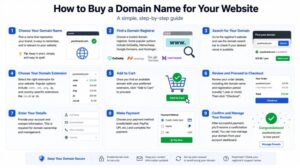
How to Buy a Domain: Step-by-Step
Here’s the exact process to register a domain name. This works with any major registrar.
Step 1 — Search for an Available Domain
Go to a registrar (Namecheap, Cloudflare, Hostinger, GoDaddy) and type your desired domain name into the search bar. The registrar will show you whether it’s available and, if not, suggest alternatives.
If your first choice is taken, try: changing the TLD, adding a location modifier (e.g. yourbrandnepal.com), adding your industry (e.g. yourbrandstudio.com), or buying it on the aftermarket if budget allows.
Step 2 — Choose a Reputable Domain Registrar
Any ICANN-accredited registrar can sell you a domain — the underlying registration is the same. The difference is in pricing, renewal rates, privacy policies, interface quality, and customer support.
Don’t buy your domain just because it’s the first search result. Compare renewal prices before committing. A $1 first-year deal that renews at $30/year is a worse deal than a $10 domain that renews at $12/year.
Step 3 — Review the Domain Details
Before clicking “Add to Cart,” confirm:
- The exact domain spelling is correct
- The TLD is what you intended
- The registration period (how many years)
- Renewal pricing — look for this explicitly; some registrars bury it
Step 4 — Add Domain Privacy Protection
When you register a domain, ICANN requires registrars to collect your personal information (name, address, email, phone). This data is stored in the WHOIS database, which is publicly accessible.
Without privacy protection, anyone can look up your home address. Add domain privacy. Almost every registrar offers it — Namecheap and Cloudflare include it free.
Step 5 — Choose Your Registration Period
Most registrars let you register for 1–10 years. Longer registration periods have a minor indirect benefit: they signal to Google that the domain is intended to stay active (though this is a very weak signal, not a ranking factor).
Practically speaking, registering for 2–3 years reduces the chance of accidentally losing your domain if you forget to renew.
Step 6 — Complete Checkout
You’ll typically see upsells for hosting, SSL certificates, email, website builders, and more. Some are useful. Most are not immediately necessary.
SSL certificate: Many hosts now include free SSL (via Let’s Encrypt). Don’t pay for one through your registrar unless your hosting provider can’t provide it.
Email hosting: If you want a professional email (you@yourdomain.com), you’ll need email hosting — but that’s separate from domain registration.
Step 7 — Verify Your Email and Access Your Domain
After purchase, the registrar will send a verification email to the address you registered with. Click the link to verify. This is an ICANN requirement.
Once verified, you’ll access your domain control panel, where you can manage DNS records, set up redirects, transfer to hosting, and configure everything else.
If you’re connecting your domain to a WordPress hosting account, you’ll update the nameservers in this control panel to point to your host’s DNS servers.
Best Domain Registrars Compared (2025)
| Registrar | .com First Year | .com Renewal | Free Privacy | Known For |
|---|---|---|---|---|
| Namecheap | ~$9–$11 | ~$13–$14/yr | Yes (free) | Best for beginners; transparent pricing |
| Cloudflare Registrar | At-cost (~$9.15) | At-cost (~$9.15/yr) | Yes (free) | No markup — wholesale pricing |
| Hostinger | ~$1–$2 (promo) | ~$14–$15/yr | Yes (free) | Best if bundling with Hostinger hosting |
| GoDaddy | ~$0.99 (promo) | ~$22–$25/yr | Paid add-on | Largest registrar; aggressive upsells |
Namecheap
Namecheap has been a favourite among bloggers and developers for years. Transparent pricing, free WHOIS privacy, a clean interface, and no heavy-handed upselling make it one of the best starting points for anyone buying their first domain.
Cloudflare Registrar
Now this is where things get interesting. Cloudflare sells domains at wholesale cost — meaning they make zero profit on registrations. There are no promotional tricks, no inflated renewals. The catch: you can’t register new domains directly with Cloudflare (as of 2025, they’re rolling out new registration); primarily it’s best for transfers. But if your goal is the lowest possible long-term cost, Cloudflare is hard to beat.
Hostinger
If you’re planning to host your site with Hostinger, bundling your domain there makes setup simpler — just make sure your hosting plan supports good site speed performance. Their promotional domain pricing is aggressive, but check the renewal rate on any plan before committing.
GoDaddy
GoDaddy is the largest domain registrar in the world. Their first-year pricing can be extremely cheap. But — and this is important — renewal prices are among the highest in the industry. The interface is cluttered with upsell prompts, and privacy protection costs extra. For most beginners, there are better options.
How Much Does a Domain Cost?
A standard .com domain costs between $9–$15 per year at renewal with reputable registrars. Here’s a rough breakdown:
| Domain Type | Typical Annual Cost |
|---|---|
| .com (standard) | $9–$15/yr |
| .org | $10–$15/yr |
| .net | $11–$15/yr |
| ccTLD (.co.uk, .np etc.) | $5–$20/yr |
| New gTLD (.blog, .store) | $20–$50/yr |
| Premium domain (aftermarket) | $100–$1,000,000+ |
First-Year Deals vs Renewal Prices: The Trap to Watch
The most common mistake beginners make? Buying a domain for $0.99 and being shocked by a $25 renewal bill twelve months later.
Always check the renewal price before purchasing. It’s usually shown in small text near the “Add to Cart” button, or on the product details page. Reputable registrars like Namecheap and Cloudflare keep renewal prices reasonable and transparent.
Premium Domains: Are They Worth It?
Premium domains are previously registered names — often short, memorable, keyword-rich — that someone is reselling at a higher price. They range from a few hundred dollars to millions.
For most bloggers and small businesses, premium domains are unnecessary. A well-branded original name you register fresh will serve you better than paying $5,000 for bestnepalblog.com. Exceptions exist: if a highly brandable domain is available at a reasonable price (under $500) and you’re building something long-term, it may be worth it.
Domain Privacy and Security
What Is WHOIS and Why Should You Care?
WHOIS is a publicly accessible database that stores the registration details of every domain: owner name, address, email, phone number, and registration dates. Anyone can look up this information for any domain.
Without privacy protection, your personal contact information is visible to anyone — including spammers, scrapers, and bad actors. Many domain registrars offer WHOIS privacy (also called Domain Privacy or Privacy Protection) as a free or low-cost add-on. It replaces your real contact details with the registrar’s proxy information.
Enable it. Always.
ICANN, Transfers, and Domain Locking
A few security features worth knowing:
Domain Lock (Registrar Lock): When enabled, this prevents unauthorised transfer of your domain to another registrar. Keep it on unless you’re actively initiating a transfer.
ICANN Transfer Policy: When you buy a domain, ICANN imposes a 60-day transfer lock — you cannot move the domain to another registrar for 60 days after purchase or update. This is a security measure.
Two-Factor Authentication: Enable 2FA on your registrar account. A hijacked registrar account means someone can point your domain anywhere they want.
Domain Renewal: What Happens If You Forget?
Domain expiry is one of the most avoidable disasters in website ownership. Here’s the timeline:
- Grace Period (0–30 days after expiry): You can usually renew at the normal price.
- Redemption Period (31–75 days after expiry): Renewal is still possible but expensive — often $80–$200+ in redemption fees.
- Release: After the redemption period, the domain is released publicly. Anyone can register it — including competitors, domain squatters, or spammers.
How to Set Up Auto-Renewal the Right Way
Enable auto-renewal in your registrar dashboard. But — and this matters — make sure your payment method stays current. If your card expires and auto-renewal fails, you’re back to square one.
Best practice: enable auto-renewal AND set a calendar reminder 60 days before expiry as a backup.
Common Domain Buying Mistakes to Avoid
Buying from the cheapest provider without checking renewal rates. The $0.99 first year becomes a $25 annual bill.
Skipping domain privacy. Your personal information becomes publicly searchable within hours of registration.
Choosing a name that’s too similar to a trademark. Domain registrars don’t check for trademark conflicts. You can register nikestore.com — but you won’t keep it long.
Using hyphens to get around an unavailable name. If yourbrand.com is taken, your-brand.com isn’t the answer. Consider a different name or TLD.
Registering with your hosting provider by default. Bundling is convenient, but it creates lock-in. If you ever want to switch hosts, transferring domains held by the same provider can be cumbersome.
Letting your domain expire. Set up auto-renewal. Add a backup calendar reminder.
Ready to Buy Your Domain?
The actual purchase takes five minutes. The thinking behind it is what this guide has been preparing you for.
Start with what you want your domain to communicate — then run it through the checklist above. Check availability at Namecheap or Cloudflare. Confirm the renewal price before you pay. Enable privacy protection. Set up auto-renewal.
That’s it. You now own a corner of the internet.
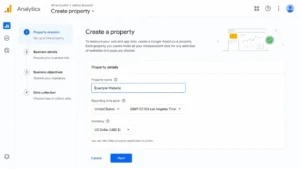
The next step is connecting your domain to hosting, setting up your website, and verifying it in Google Search Console so Google can start crawling it. While you’re at it, installing Google Analytics on day one means you won’t miss a single visit from the moment your site goes live. If you’re building on WordPress, understanding how DNS propagation works and how to configure your nameservers will make the process much smoother — and avoiding common WordPress setup mistakes will save you hours of frustration down the line.
Here’s the bigger picture worth sitting with: your domain name is one of the few digital assets that can genuinely appreciate in value over time. Businesses have been built and sold on the strength of a single, well-chosen domain. Choose it with that possibility in mind.
Frequently Asked Questions
How much does a domain name cost? Most standard .com domains cost between $10–$15 per year at renewal. First-year promotions can be as low as $1, but always check the renewal rate before committing. Premium domains resold on the aftermarket start at $100 and can reach into the millions.
Can you buy a domain forever? No. Domains are leased for 1–10 years and must be renewed. ICANN does not allow permanent domain purchases. The closest option is registering for 10 years at a time.
Do I need hosting before buying a domain? No. You can register a domain independently and connect it to hosting later. They are separate services.
What is the best place to buy a domain name? For beginners: Namecheap (transparent pricing, free privacy). For lowest cost: Cloudflare Registrar (at-cost pricing). For bundled hosting: Hostinger.
Does a .com domain rank better on Google? No. Google treats all TLDs equally as ranking factors. The .com extension carries more user trust, which can affect click-through rates, but it confers no direct ranking advantage.
What is domain privacy protection? Domain privacy replaces your personal contact information in the public WHOIS database with the registrar’s proxy details. This prevents your name, address, and email from being publicly searchable. Most quality registrars offer it free.
How do I register a domain for a small business? Search for availability at a quality registrar. Choose .com where possible. Keep the name short and brandable. Register for 2–5 years. Enable privacy protection and auto-renewal. Then connect your domain to a hosting account and install your website platform.
What happens if I forget to renew my domain? After expiry, a grace period of 30–45 days applies at normal renewal rates. After that, a redemption period (up to 75 days total) kicks in with fees of $80–$200+. After that, the domain is released and anyone can register it.